
Completed online bookings made through the public network.
Connect · Vacancies
How to fill empty class places in your studio.
fitVibe Connect displays available classes to users searching for activities near them. So you can take advantage of low-occupancy hours and positions that open up after cancellation, without a monthly fixed fee.
Studio week · program
Completeness
MonTueWedThuFri
07:30
Breakfast Reformer
3 / 8
10:30
Low occupancy yoga
0 / 10
13:00
EMS Express
2 / 6
18:00
Reformer Pilates
8 / 8
20:30
Evening Mobility
3 / 10
184
indicative vacancies / week in a program with low occupancy hours
Network details
The fitVibe network at real numbers.
Live snapshot from the same public network data used in the original, without fake member counts.Public studios that people can discover through fitVibe.
Reviews collected after real booking experiences.
01 · The problem
Dinners are filling up. The hours in between, not always.
Morning classes, lunch gaps, weekday times with low occupancy and last minute cancellations leave non-returnable capacity. The coach, venue and time already exist - the point is to reach users with booking intent.
Empty spots
expiring capacity
Low occupancy hours
demand without projection
Last minute cancellation
position lost in minutes
02 · How fitVibe Connect works
Link your course plan to users looking for online booking near them.
Connect shows the available places of your studio in searches such as "pilates near me", "yoga today" and "reformer Athens".
01
PROGRAM
You go through the courses and available places.
You declare hours, categories and capacity. Users only see seats that can actually be booked online.
02
SEARCH
New interns find you when they search.
Those looking for pilates, yoga, EMS or wellness near them see your studio with area, time, price and availability.
03
RESERVATION
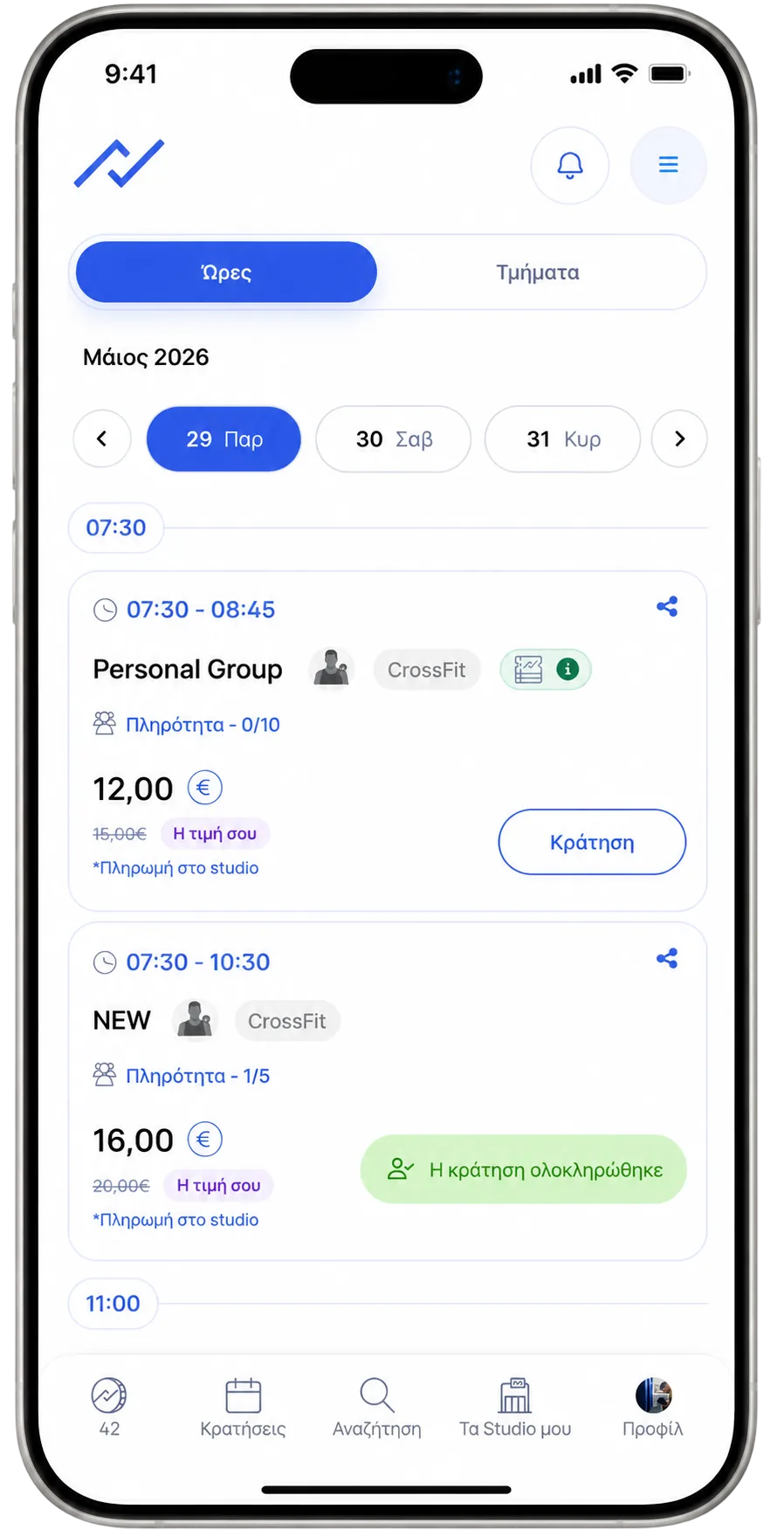
Vacancies are booked online.
The user chooses a lesson, reserves a place from the mobile and the booking is organized through fitVibe.
18:00Reformer Pilates8 / 8 · complete
11:00Yoga Flow3 / 10 · seats available
13:15EMS Express2 / 6 · online booking
03 · Screening during low occupancy hours
Find common in the hours when no one is looking for you.
fitVibe shows available options to users who search for "now", "this morning", "pilates near me" or "yoga near me". So the quiet hours gain real visibility.
- Lunch screening for remote workers, freelancers and parents.
- Display the weekday hours that have seats available.
- Show available seat when there is a cancellation just before the class.
04 · No new system
Better use of program you are already running.
You don't build demand from scratch. You put your available seats in front of users who are already looking for online booking.Keep the courses you are already running.
Hours, trainers, rooms and categories remain as you have designed them. fitVibe only shows available seats that can be booked.
Enter the network without changing your daily life.
The fitVibe team organizes the profile, basic information and available times so that users can clearly see what they can book.
You appear on the network for free.
There is no cost or commitment to join. Connect acts as a viewing and booking channel for your available seats.
05 · Quick activation
Activation after review
We set up the public profile, pass the basic information of the studio and bring online the available courses that you want to be filled by Connect.
Get started with Connect01Request for cooperationStudio and category basics.
02Public profileMini-site, map, schedule and booking rules.
03Seats availableAvailable courses are displayed to users.
04Bookings and imageTrack which hours are filling up and what needs improvement.
"The morning class that was running with few bookings fills up more often when it shows up to users searching at that time. It doesn't change the class - it changes where the audience sees it."
Example of a low occupancy class · fitVibe Connect+ Bookingsat low occupancy times
Same dayusers with booking intent
Freeinclusion for the studio
06 · Next steps
Start with Connect, evolve with Plus.
Connect = view and discover. Plus = integrated management and development. One platform, two levels.View and discover
Bring tourists, travelers and new users to your door. Pay per visit, no obligation.
✓ Studio profile and small page in the app
✓ Smart Map pin and nearby discovery
✓ Online bookings with fitCoins
✓ Ratings and basic dashboard
✓ Monthly settlement in €
Management and development
All of Connect + unified customer management, automation and AI suggestions.
✓ All of Connect + private clientele
✓ Cash and private bookings
✓ Advanced statistics and peak hours
✓ AI business assistant
✓ Automation and maintenance tools
Start with Connect - upgrade to Plus whenever you're ready. Easy and fast.
Everything the studio owners ask.
Clear answers about how Connect works alongside what you already run.
No. Connect shows available spots for online booking to users searching for a specific time, area and activity.
Nope. You can start with the class schedule and available places that you register on fitVibe. Our team sets up the process so that your daily operation does not change.
For the studio, membership is free. Connect acts as a discovery and booking channel through the fitVibe network, with no activation costs or commitment.
Nope. Connect targets additional demand for available seats and low occupancy times to fill otherwise vacant seats.
Activation after review
Your next vacancy can be reserved.
Enter fitVibe Connect and display classes with available seats to users looking for pilates, yoga or wellness near them - no new system, no cost to the studio, no risk.
